

Building your first website from scratch is an exciting journey that empowers you to establish a digital presence, showcase your skills, or launch a business online. Whether you’re a beginner with no coding experience or an aspiring developer, this detailed guide will walk you through every step of creating a professional, functional, and visually appealing website. We’ll cover everything from planning and design to coding, hosting, and optimization, ensuring you have the tools and knowledge to succeed.
- Why Building Your First Website Matters
- Step 1: Planning Your Website
- Define Your Website’s Purpose
- Identify Your Target Audience
- Choose a Niche and Unique Selling Proposition (USP)
- Create a Site Map
- Step 2: Choosing the Right Tools and Technologies
- Front-End Technologies: HTML, CSS, and JavaScript
- Text Editors and IDEs
- Design Tools
- Content Management Systems (Optional)
- Step 3: Designing Your Website
- Understand UX/UI Principles
- Choose a Color Scheme
- Select Typography
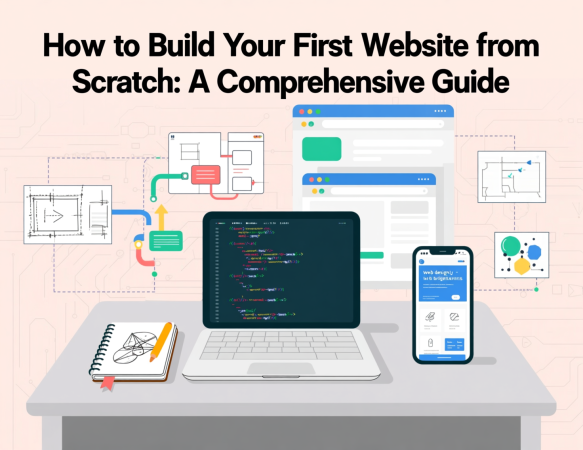
- Create Wireframes and Mockups
- Ensure Mobile Responsiveness
- Step 4: Coding Your Website
- Step 5: Hosting Your Website
- Step 6: Optimizing for SEO
- Step 7: Adding Advanced Features
- Step 8: Maintaining Your Website
- Suggestions and Recommendations
- FAQs
Why Building Your First Website Matters
Creating your first website from scratch is more than just a technical exercise—it’s a chance to express creativity, build a brand, and connect with a global audience. Websites are essential for businesses, freelancers, bloggers, and hobbyists alike. A well-crafted website can serve as a portfolio, an e-commerce platform, or a blog, offering endless possibilities. By building it yourself, you gain full control over design, functionality, and performance, while learning valuable skills that enhance your digital literacy.
Step 1: Planning Your Website
Before writing a single line of code, planning is crucial. A well-thought-out plan ensures your website aligns with your goals and resonates with your target audience.
Define Your Website’s Purpose
Every website needs a clear purpose. Are you building a personal blog, an online store, a portfolio, or a business site? Defining your goal shapes every decision, from design to content. For example:
More Read

- Personal Blog: Focus on engaging content and a user-friendly layout.
- E-commerce: Prioritize product pages, secure payment gateways, and intuitive navigation.
- Portfolio: Showcase your work with high-quality visuals and minimalistic design.
Identify Your Target Audience
Understanding your audience helps tailor your website’s tone, design, and functionality. Consider:
- Demographics: Age, location, interests, and technical proficiency.
- Needs: What problems does your audience face, and how can your website solve them?
- Behavior: How do they interact with websites? Are they mobile users or desktop browsers?
Choose a Niche and Unique Selling Proposition (USP)
A niche helps your website stand out. For instance, if you’re building a blog, focus on a specific topic like sustainable living or tech tutorials. Your USP—such as unique content, expert insights, or a distinctive design—sets you apart from competitors.
Create a Site Map
A site map outlines your website’s structure. Sketch a hierarchy of pages, such as:
- Home: Introduces your brand and purpose.
- About: Shares your story or mission.
- Services/Products: Details what you offer.
- Blog: Hosts articles or updates.
- Contact: Provides ways to reach you.
Use tools like Lucidchart or a simple pen-and-paper sketch to visualize your site’s navigation.
Step 2: Choosing the Right Tools and Technologies
To build your first website from scratch, you’ll need tools for coding, design, and hosting. Here’s a breakdown of the essentials.
Front-End Technologies: HTML, CSS, and JavaScript
These are the building blocks of web development:
- HTML (HyperText Markup Language): Structures content, defining elements like headings, paragraphs, and images.
- CSS (Cascading Style Sheets): Styles your website, controlling colors, fonts, and layouts.
- JavaScript: Adds interactivity, such as sliders, forms, or animations.
For beginners, start with HTML and CSS, then gradually incorporate JavaScript for dynamic features.
Text Editors and IDEs
A reliable code editor streamlines development. Popular options include:
- Visual Studio Code: Free, lightweight, and feature-rich with extensions for web development.
- Sublime Text: Fast and customizable for quick edits.
- Atom: Open-source and beginner-friendly.
Design Tools
Design tools help create mockups and visuals:
- Figma: Collaborative design platform for wireframes and prototypes.
- Adobe XD: Professional tool for designing user interfaces.
- Canva: Beginner-friendly for creating graphics and logos.
Content Management Systems (Optional)
While this guide focuses on building from scratch, a CMS like WordPress can simplify content management for non-coders. However, coding your site offers greater flexibility and control.
Step 3: Designing Your Website
A visually appealing and user-friendly design is critical for engaging visitors. Here’s how to design your first website from scratch.
Understand UX/UI Principles
User Experience (UX) and User Interface (UI) design ensure your website is intuitive and attractive:
- UX: Focuses on functionality and ease of use. Ensure clear navigation, fast load times, and mobile responsiveness.
- UI: Focuses on aesthetics, including color schemes, typography, and visual hierarchy.
Choose a Color Scheme
Select a color palette that reflects your brand:
- Primary Colors: Use 1–2 dominant colors for consistency.
- Accent Colors: Add contrast for buttons or links.
- Neutral Colors: Use for backgrounds and text.
Tools like Coolors or Adobe Color generate harmonious palettes.
Select Typography
Typography impacts readability and aesthetics:
- Font Pairing: Combine a heading font (e.g., Montserrat) with a body font (e.g., Open Sans).
- Readability: Ensure fonts are legible on all devices.
- Consistency: Limit to 2–3 fonts to avoid clutter.
Create Wireframes and Mockups
Wireframes are basic sketches of your website’s layout, while mockups add colors and visuals. Use Figma or Adobe XD to create:
- Header: Includes logo, navigation menu, and call-to-action (CTA).
- Content Area: Displays main content, such as text, images, or products.
- Footer: Contains contact info, social links, and secondary navigation.
Ensure Mobile Responsiveness
With over 50% of web traffic from mobile devices, your website must adapt to different screen sizes. Use responsive design techniques like:
- Fluid Grids: Flexible layouts that adjust to screen width.
- Media Queries: CSS rules that apply styles based on device size.
- Mobile-First Design: Start designing for smaller screens, then scale up.
Step 4: Coding Your Website
Now it’s time to bring your design to life by coding your first website from scratch.
Setting Up Your Project
Create a project folder with the following structure:
- index.html: Your homepage.
- styles.css: Your CSS file for styling.
- script.js: Your JavaScript file for interactivity.
- assets/: Folder for images, fonts, and other resources.
Writing HTML
HTML provides the structure. Here’s a basic example for a homepage:
Step 5: Hosting Your Website
To make your website accessible online, you need a domain and hosting service.
Choose a Domain Name
Your domain name is your website’s address (e.g., www.mywebsite.com). Tips:
- Keep it Short: Easy to remember and type.
- Reflect Your Brand: Include keywords or your name.
- Use .com: Preferred for credibility, but .co or .org work too.
Purchase domains from registrars like GoDaddy, Namecheap, or Google Domains.
Select a Hosting Provider
Hosting providers store your website’s files and make them accessible online. Popular options:
- Bluehost: Beginner-friendly with WordPress integration.
- SiteGround: Fast and reliable with excellent support.
- Netlify: Free for static sites, ideal for beginners.
- Vercel: Great for modern web frameworks.
Deploy Your Website
For static sites, upload files to your host via:
- FTP: Use tools like FileZilla to transfer files.
- Git: Push to platforms like GitHub and deploy via Netlify or Vercel.
- Control Panel: Use your host’s file manager for manual uploads.
Step 6: Optimizing for SEO
To rank higher on Google, optimize your first website from scratch for search engines.
Keyword Research
Use tools like Google Keyword Planner or Ahrefs to find relevant keywords, such as “build your first website,” “website from scratch,” or “beginner web development.”
On-Page SEO
Incorporate keywords naturally:
- Title Tags: Include your focus keyword (e.g., “How to Build Your First Website from Scratch”).
- Meta Descriptions: Write compelling summaries (see below).
- Headings: Use H1 for the main title and H2/H3 for subheadings.
- Alt Text: Add descriptive alt text to images for accessibility and SEO.
Technical SEO
Ensure your website is fast and secure:
- Fast Loading: Optimize images and minify CSS/JavaScript.
- SSL Certificate: Use HTTPS for security.
- Mobile Optimization: Ensure responsiveness.
Content Quality
High-quality content keeps users engaged:
- Depth: Provide detailed, actionable advice.
- Engagement: Use visuals, examples, and clear language.
- Updates: Regularly update content to stay relevant.
Step 7: Adding Advanced Features
Once your basic website is live, consider adding advanced features:
- Contact Forms: Use HTML forms with JavaScript for validation.
- Analytics: Integrate Google Analytics to track visitors.
- E-commerce: Add payment gateways like Stripe or PayPal.
- Blog: Create a blog section with regular posts to boost SEO.
Step 8: Maintaining Your Website
Regular maintenance keeps your website secure and relevant:
- Update Content: Add new pages or blog posts.
- Monitor Performance: Use tools like Google Search Console.
- Backup Regularly: Protect your site from data loss.
- Security: Update plugins and use strong passwords.
Suggestions and Recommendations
To make your first website from scratch a success:
- Learn Continuously: Explore advanced topics like React, Node.js, or databases.
- Engage Your Audience: Use social media to promote your site.
- Test Iteratively: Gather user feedback and refine your design.
- Stay Updated: Follow web development trends to keep your site modern.
FAQs
- What is the easiest way to build your first website from scratch? Start with HTML and CSS for structure and style, using a simple text editor like VS Code, and host on a beginner-friendly platform like Netlify.
- Do I need coding skills to build a website from scratch? Basic HTML and CSS knowledge is enough to start. JavaScript can be added for interactivity as you learn.
- How long does it take to build a website from scratch? A simple site can take a few hours to a week, depending on complexity and your experience level.
- What tools are best for beginners building a website? Use VS Code for coding, Figma for design, and Netlify for hosting.
- How much does it cost to build a website from scratch? Costs vary: free for static sites on Netlify, $10–$100/year for domains, and $5–$50/month for hosting.
- Can I build a website without a CMS? Yes, coding from scratch with HTML, CSS, and JavaScript offers full control and flexibility.
- What is responsive design, and why is it important? Responsive design ensures your site works on all devices, improving user experience and SEO.
- How do I choose a domain name? Pick a short, memorable name that reflects your brand and includes relevant keywords.
- What is the difference between HTML and CSS? HTML structures content, while CSS styles it, controlling colors, fonts, and layouts.
- How do I make my website rank on Google? Optimize with keywords, fast loading, mobile responsiveness, and high-quality content.
- Can I add a blog to my website? Yes, create a blog section with HTML/CSS and update it regularly to boost engagement and SEO.
- What is hosting, and why do I need it? Hosting stores your website’s files, making them accessible online. It’s essential for going live.
- How do I test my website before launching? Use browser developer tools, Live Server, or tools like WAVE for accessibility testing.
- What is JavaScript used for in web development? JavaScript adds interactivity, like forms, animations, or dynamic content updates.
- How do I secure my website? Use HTTPS, strong passwords, regular backups, and keep software updated.